> ## Documentation Index
> Fetch the complete documentation index at: https://langchain.idochub.dev/llms.txt
> Use this file to discover all available pages before exploring further.
# 构建 SQL 代理
在本教程中,您将学习如何构建一个能够回答关于 SQL 数据库问题的代理。您将以两种方式构建代理:
1. [使用最少代码构建代理](#使用最少代码构建代理)
2. [使用 LangGraph 构建自定义工作流](#构建自定义工作流)
从高层次来看,该代理将执行以下步骤:
构建基于 SQL 数据库的问答系统需要执行模型生成的 SQL 查询语句,这本身存在固有风险。请确保您的数据库连接权限始终尽可能严格地限制在代理所需的最小范围内。这虽然不能完全消除风险,但可以显著降低构建模型驱动系统所带来的潜在威胁。
## 开始之前
1. 安装依赖项:
```bash pip theme={null}
pip install langchain langgraph langchain-community
```
2. 设置 [LangSmith](https://smith.langchain.com),以便检查链或代理内部的运行情况。然后设置以下环境变量:
```shell theme={null}
export LANGSMITH_TRACING="true"
export LANGSMITH_API_KEY="..."
```
## 使用最少代码构建代理
### 1. 选择一个 LLM
选择一个支持[工具调用](/oss/python/integrations/providers)的模型:
```shell theme={null}
pip install -U "langchain[openai]"
```
```python theme={null}
import os
from langchain.chat_models import init_chat_model
os.environ["OPENAI_API_KEY"] = "sk-..."
llm = init_chat_model("openai:gpt-4.1")
```
👉 Read the [OpenAI integration docs](https://python.langchain.com/docs/integrations/chat/openai/)
```shell theme={null}
pip install -U "langchain[anthropic]"
```
```python theme={null}
import os
from langchain.chat_models import init_chat_model
os.environ["ANTHROPIC_API_KEY"] = "sk-..."
llm = init_chat_model("anthropic:claude-3-5-sonnet-latest")
```
👉 Read the [Anthropic integration docs](https://python.langchain.com/docs/integrations/chat/anthropic/)
```shell theme={null}
pip install -U "langchain[openai]"
```
```python theme={null}
import os
from langchain.chat_models import init_chat_model
os.environ["AZURE_OPENAI_API_KEY"] = "..."
os.environ["AZURE_OPENAI_ENDPOINT"] = "..."
os.environ["OPENAI_API_VERSION"] = "2025-03-01-preview"
llm = init_chat_model(
"azure_openai:gpt-4.1",
azure_deployment=os.environ["AZURE_OPENAI_DEPLOYMENT_NAME"],
)
```
👉 Read the [Azure integration docs](https://python.langchain.com/docs/integrations/chat/azure_chat_openai/)
```shell theme={null}
pip install -U "langchain[google-genai]"
```
```python theme={null}
import os
from langchain.chat_models import init_chat_model
os.environ["GOOGLE_API_KEY"] = "..."
llm = init_chat_model("google_genai:gemini-2.0-flash")
```
👉 Read the [Google GenAI integration docs](https://python.langchain.com/docs/integrations/chat/google_generative_ai/)
```shell theme={null}
pip install -U "langchain[aws]"
```
```python theme={null}
from langchain.chat_models import init_chat_model
# Follow the steps here to configure your credentials:
# https://docs.aws.amazon.com/bedrock/latest/userguide/getting-started.html
llm = init_chat_model(
"anthropic.claude-3-5-sonnet-20240620-v1:0",
model_provider="bedrock_converse",
)
```
👉 Read the [AWS Bedrock integration docs](https://python.langchain.com/docs/integrations/chat/bedrock/)
以下示例中的输出使用的是 OpenAI 模型。
### 2. 配置数据库
在本教程中,您将创建一个 [SQLite 数据库](https://www.sqlitetutorial.net/sqlite-sample-database/)。SQLite 是一种轻量级数据库,易于设置和使用。我们将加载 `chinook` 数据库,这是一个代表数字媒体商店的示例数据库。
为方便起见,我们已将数据库文件 (`Chinook.db`) 托管在公共 GCS 存储桶上。
```python theme={null}
import requests, pathlib
url = "https://storage.googleapis.com/benchmarks-artifacts/chinook/Chinook.db"
local_path = pathlib.Path("Chinook.db")
if local_path.exists():
print(f"{local_path} 已存在,跳过下载。")
else:
response = requests.get(url)
if response.status_code == 200:
local_path.write_bytes(response.content)
print(f"文件已下载并保存为 {local_path}")
else:
print(f"下载文件失败。状态码:{response.status_code}")
```
### 3. 添加用于数据库交互的工具
使用 `langchain_community` 包中提供的 `SQLDatabase` 封装器与数据库交互。该封装器提供了一个简单的接口用于执行 SQL 查询并获取结果:
```python theme={null}
from langchain_community.utilities import SQLDatabase
db = SQLDatabase.from_uri("sqlite:///Chinook.db")
```
您将提取有助于 LLM 生成查询语句的数据库信息,并将其存储在 LLM 提示中。
```python theme={null}
SCHEMA = db.get_table_info()
```
```sql theme={null}
CREATE TABLE "Album" (
"AlbumId" INTEGER NOT NULL,
"Title" NVARCHAR(160) NOT NULL,
"ArtistId" INTEGER NOT NULL,
PRIMARY KEY ("AlbumId"),
FOREIGN KEY("ArtistId") REFERENCES "Artist" ("ArtistId")
)
/*
Album 表中的前 3 行数据:
AlbumId Title ArtistId
1 For Those About To Rock We Salute You 1
2 Balls to the Wall 2
3 Restless and Wild 2
*/
CREATE TABLE "Artist" (
"ArtistId" INTEGER NOT NULL,
"Name" NVARCHAR(120),
PRIMARY KEY ("ArtistId")
)
/*
Artist 表中的前 3 行数据:
ArtistId Name
1 AC/DC
2 Accept
3 Aerosmith
*/
CREATE TABLE "Customer" (
"CustomerId" INTEGER NOT NULL,
"FirstName" NVARCHAR(40) NOT NULL,
"LastName" NVARCHAR(20) NOT NULL,
"Company" NVARCHAR(80),
"Address" NVARCHAR(70),
"City" NVARCHAR(40),
"State" NVARCHAR(40),
"Country" NVARCHAR(40),
"PostalCode" NVARCHAR(10),
"Phone" NVARCHAR(24),
"Fax" NVARCHAR(24),
"Email" NVARCHAR(60) NOT NULL,
"SupportRepId" INTEGER,
PRIMARY KEY ("CustomerId"),
FOREIGN KEY("SupportRepId") REFERENCES "Employee" ("EmployeeId")
)
/*
Customer 表中的前 3 行数据:
CustomerId FirstName LastName Company Address City State Country PostalCode Phone Fax Email SupportRepId
1 Luís Gonçalves Embraer - Empresa Brasileira de Aeronáutica S.A. Av. Brigadeiro Faria Lima, 2170 São José dos Campos SP Brazil 12227-000 +55 (12) 3923-5555 +55 (12) 3923-5566 luisg@embraer.com.br 3
2 Leonie Köhler None Theodor-Heuss-Straße 34 Stuttgart None Germany 70174 +49 0711 2842222 None leonekohler@surfeu.de 5
3 François Tremblay None 1498 rue Bélanger Montréal QC Canada H2G 1A7 +1 (514) 721-4711 None ftremblay@gmail.com 3
*/
CREATE TABLE "Employee" (
"EmployeeId" INTEGER NOT NULL,
"LastName" NVARCHAR(20) NOT NULL,
"FirstName" NVARCHAR(20) NOT NULL,
"Title" NVARCHAR(30),
"ReportsTo" INTEGER,
"BirthDate" DATETIME,
"HireDate" DATETIME,
"Address" NVARCHAR(70),
"City" NVARCHAR(40),
"State" NVARCHAR(40),
"Country" NVARCHAR(40),
"PostalCode" NVARCHAR(10),
"Phone" NVARCHAR(24),
"Fax" NVARCHAR(24),
"Email" NVARCHAR(60),
PRIMARY KEY ("EmployeeId"),
FOREIGN KEY("ReportsTo") REFERENCES "Employee" ("EmployeeId")
)
/*
Employee 表中的前 3 行数据:
EmployeeId LastName FirstName Title ReportsTo BirthDate HireDate Address City State Country PostalCode Phone Fax Email
1 Adams Andrew General Manager None 1962-02-18 00:00:00 2002-08-14 00:00:00 11120 Jasper Ave NW Edmonton AB Canada T5K 2N1 +1 (780) 428-9482 +1 (780) 428-3457 andrew@chinookcorp.com
2 Edwards Nancy Sales Manager 1 1958-12-08 00:00:00 2002-05-01 00:00:00 825 8 Ave SW Calgary AB Canada T2P 2T3 +1 (403) 262-3443 +1 (403) 262-3322 nancy@chinookcorp.com
3 Peacock Jane Sales Support Agent 2 1973-08-29 00:00:00 2002-04-01 00:00:00 1111 6 Ave SW Calgary AB Canada T2P 5M5 +1 (403) 262-3443 +1 (403) 262-6712 jane@chinookcorp.com
*/
CREATE TABLE "Genre" (
"GenreId" INTEGER NOT NULL,
"Name" NVARCHAR(120),
PRIMARY KEY ("GenreId")
)
/*
Genre 表中的前 3 行数据:
GenreId Name
1 Rock
2 Jazz
3 Metal
*/
CREATE TABLE "Invoice" (
"InvoiceId" INTEGER NOT NULL,
"CustomerId" INTEGER NOT NULL,
"InvoiceDate" DATETIME NOT NULL,
"BillingAddress" NVARCHAR(70),
"BillingCity" NVARCHAR(40),
"BillingState" NVARCHAR(40),
"BillingCountry" NVARCHAR(40),
"BillingPostalCode" NVARCHAR(10),
"Total" NUMERIC(10, 2) NOT NULL,
PRIMARY KEY ("InvoiceId"),
FOREIGN KEY("CustomerId") REFERENCES "Customer" ("CustomerId")
)
/*
Invoice 表中的前 3 行数据:
InvoiceId CustomerId InvoiceDate BillingAddress BillingCity BillingState BillingCountry BillingPostalCode Total
1 2 2009-01-01 00:00:00 Theodor-Heuss-Straße 34 Stuttgart None Germany 70174 1.98
2 4 2009-01-02 00:00:00 Ullevålsveien 14 Oslo None Norway 0171 3.96
3 8 2009-01-03 00:00:00 Grétrystraat 63 Brussels None Belgium 1000 5.94
*/
CREATE TABLE "InvoiceLine" (
"InvoiceLineId" INTEGER NOT NULL,
"InvoiceId" INTEGER NOT NULL,
"TrackId" INTEGER NOT NULL,
"UnitPrice" NUMERIC(10, 2) NOT NULL,
"Quantity" INTEGER NOT NULL,
PRIMARY KEY ("InvoiceLineId"),
FOREIGN KEY("TrackId") REFERENCES "Track" ("TrackId"),
FOREIGN KEY("InvoiceId") REFERENCES "Invoice" ("InvoiceId")
)
/*
InvoiceLine 表中的前 3 行数据:
InvoiceLineId InvoiceId TrackId UnitPrice Quantity
1 1 2 0.99 1
2 1 4 0.99 1
3 2 6 0.99 1
*/
CREATE TABLE "MediaType" (
"MediaTypeId" INTEGER NOT NULL,
"Name" NVARCHAR(120),
PRIMARY KEY ("MediaTypeId")
)
/*
MediaType 表中的前 3 行数据:
MediaTypeId Name
1 MPEG audio file
2 Protected AAC audio file
3 Protected MPEG-4 video file
*/
CREATE TABLE "Playlist" (
"PlaylistId" INTEGER NOT NULL,
"Name" NVARCHAR(120),
PRIMARY KEY ("PlaylistId")
)
/*
Playlist 表中的前 3 行数据:
PlaylistId Name
1 Music
2 Movies
3 TV Shows
*/
CREATE TABLE "PlaylistTrack" (
"PlaylistId" INTEGER NOT NULL,
"TrackId" INTEGER NOT NULL,
PRIMARY KEY ("PlaylistId", "TrackId"),
FOREIGN KEY("TrackId") REFERENCES "Track" ("TrackId"),
FOREIGN KEY("PlaylistId") REFERENCES "Playlist" ("PlaylistId")
)
/*
PlaylistTrack 表中的前 3 行数据:
PlaylistId TrackId
1 3402
1 3389
1 3390
*/
CREATE TABLE "Track" (
"TrackId" INTEGER NOT NULL,
"Name" NVARCHAR(200) NOT NULL,
"AlbumId" INTEGER,
"MediaTypeId" INTEGER NOT NULL,
"GenreId" INTEGER,
"Composer" NVARCHAR(220),
"Milliseconds" INTEGER NOT NULL,
"Bytes" INTEGER,
"UnitPrice" NUMERIC(10, 2) NOT NULL,
PRIMARY KEY ("TrackId"),
FOREIGN KEY("MediaTypeId") REFERENCES "MediaType" ("MediaTypeId"),
FOREIGN KEY("GenreId") REFERENCES "Genre" ("GenreId"),
FOREIGN KEY("AlbumId") REFERENCES "Album" ("AlbumId")
)
/*
Track 表中的前 3 行数据:
TrackId Name AlbumId MediaTypeId GenreId Composer Milliseconds Bytes UnitPrice
1 For Those About To Rock (We Salute You) 1 1 1 Angus Young, Malcolm Young, Brian Johnson 343719 11170334 0.99
2 Balls to the Wall 2 2 1 None 342562 5510424 0.99
3 Fast As a Shark 3 2 1 F. Baltes, S. Kaufman, U. Dirkscneider & W. Hoffman 230619 3990994 0.99
*/
```
### 4. 执行 SQL 查询
在执行命令前,先通过 `_safe_sql` 函数检查 LLM 生成的命令:
```python theme={null}
import re
from langchain_core.tools import tool
DENY_RE = re.compile(r"\b(INSERT|UPDATE|DELETE|ALTER|DROP|CREATE|REPLACE|TRUNCATE)\b", re.I)
HAS_LIMIT_TAIL_RE = re.compile(r"(?is)\blimit\b\s+\d+(\s*,\s*\d+)?\s*;?\s*$")
def _safe_sql(q: str) -> str:
# 标准化
q = q.strip()
# 禁止多语句(允许一个可选的尾部 ;)
if q.count(";") > 1 or (q.endswith(";") and ";" in q[:-1]):
return "错误:不允许包含多个语句。"
q = q.rstrip(";").strip()
# 只读限制
if not q.lower().startswith("select"):
return "错误:仅允许 SELECT 语句。"
if DENY_RE.search(q):
return "错误:检测到 DML/DDL 语句。仅允许只读查询。"
# 如果末尾没有 LIMIT 子句,则追加 LIMIT 5(对空白字符和换行符具有鲁棒性)
if not HAS_LIMIT_TAIL_RE.search(q):
q += " LIMIT 5"
return q
```
然后,使用 `SQLDatabase` 的 `run` 方法配合 `execute_sql` 工具执行命令:
```python theme={null}
@tool
def execute_sql(query: str) -> str:
"""执行一个只读的 SQLite SELECT 查询并返回结果。"""
query = _safe_sql(query)
q = query
if q.startswith("Error:"):
return q
try:
return db.run(q)
except Exception as e:
return f"错误:{e}"
```
### 5. 使用 `create_agent`
使用 `create_agent` 以最少代码构建一个 [ReAct 代理](https://arxiv.org/pdf/2210.03629)。该代理将解析请求并生成 SQL 命令。工具将检查命令的安全性,然后尝试执行命令。如果命令出错,错误消息将返回给模型。模型随后可以检查原始请求和新的错误消息,并生成一个新的命令。此过程可以持续进行,直到 LLM 成功生成命令或达到最大尝试次数。这种向模型提供反馈(在此处为错误消息)的模式非常强大。
使用描述性的系统提示初始化代理,以自定义其行为:
```python theme={null}
SYSTEM = f"""您是一位谨慎的 SQLite 分析师。
权威模式(请勿虚构列或表):
{SCHEMA}
规则:
- 请逐步思考。
- 当您需要数据时,请调用 `execute_sql` 工具并传入一个 SELECT 查询。
- 仅允许只读操作;禁止 INSERT/UPDATE/DELETE/ALTER/DROP/CREATE/REPLACE/TRUNCATE。
- 除非用户明确要求,否则结果限制为 5 行。
- 如果工具返回 'Error:',请修改 SQL 并重试。
- 最多尝试 5 次。
- 如果 5 次尝试后仍未成功,请向用户返回说明。
- 优先使用显式列名列表;避免使用 SELECT *。
"""
```
现在,使用模型、工具和提示创建代理:
```python theme={null}
from langchain.agents import create_agent
from langchain_core.messages import SystemMessage
agent = create_agent(
model=llm,
tools=[execute_sql],
prompt=SystemMessage(content=SYSTEM),
)
```
### 5. 运行代理
在示例查询上运行代理并观察其行为:
```python theme={null}
question = "哪个类型的曲目平均时长最长?"
for step in agent.stream(
{"messages": [{"role": "user", "content": question}]},
stream_mode="values",
):
step["messages"][-1].pretty_print()
```
```
================================ 人类消息 =================================
哪个类型的曲目平均时长最长?
================================== AI 消息 ==================================
工具调用:
execute_sql (call_4Xghu6nWYhbFlOwSgvNNiJul)
调用 ID: call_4Xghu6nWYhbFlOwSgvNNiJul
参数:
query: SELECT g.GenreId, g.Name AS GenreName, ROUND(AVG(t.Milliseconds), 2) AS AvgMilliseconds, ROUND(AVG(t.Milliseconds) / 60000.0, 2) AS AvgMinutes
FROM Track t
JOIN Genre g ON t.GenreId = g.GenreId
GROUP BY g.GenreId, g.Name
ORDER BY AVG(t.Milliseconds) DESC
LIMIT 1;
================================= 工具消息 =================================
名称: execute_sql
[(20, 'Sci Fi & Fantasy', 2911783.04, 48.53)]
================================== AI 消息 ==================================
Sci Fi & Fantasy — 平均每首曲目约 48.53 分钟。
```
代理正确地编写了查询语句,检查了查询语句,并执行了查询以生成最终回复。
您可以在 [LangSmith 跟踪](https://smith.langchain.com/public/cd2ce887-388a-4bb1-a29d-48208ce50d15/r) 中检查上述运行的所有细节,包括所采取的步骤、调用的工具、LLM 接收到的提示等。
#### (可选)使用 Studio
[Studio](/langgraph-platform/langgraph-studio) 提供了“客户端侧”循环以及内存功能,因此您可以将其作为聊天界面运行并查询数据库。您可以提出诸如“告诉我数据库的模式”或“显示前 5 名客户的发票”之类的问题。您将看到生成的 SQL 命令及其输出结果。有关如何启动的详细信息如下。
除了之前提到的包之外,您还需要:
```shell theme={null}
pip install -U langgraph-cli[inmem]>=0.4.0
```
在您要运行的目录中,您需要一个包含以下内容的 `langgraph.json` 文件:
```json theme={null}
{
"dependencies": ["."],
"graphs": {
"agent": "./sql_agent.py:agent",
"graph": "./sql_agent_langgraph.py:graph"
},
"env": ".env"
}
```
请创建一个文件 `sql_agent.py` 并插入以下内容:
```python theme={null}
# 用于 studio 的 sql_agent.py
from langchain.agents import create_agent
from langchain_core.messages import SystemMessage
# 初始化一个 LLM
from langchain.chat_models import init_chat_model
llm = init_chat_model("openai:gpt-5")
# 获取数据库,并将其本地存储
import requests, pathlib
url = "https://storage.googleapis.com/benchmarks-artifacts/chinook/Chinook.db"
local_path = pathlib.Path("Chinook.db")
if local_path.exists():
print(f"{local_path} 已存在,跳过下载。")
else:
response = requests.get(url)
if response.status_code == 200:
local_path.write_bytes(response.content)
print(f"文件已下载并保存为 {local_path}")
else:
print(f"文件下载失败。状态码:{response.status_code}")
from langchain_community.utilities import SQLDatabase
db = SQLDatabase.from_uri("sqlite:///Chinook.db")
#print(f"方言:{db.dialect}")
#print(f"可用表:{db.get_usable_table_names()}")
#print(f'示例输出:{db.run("SELECT * FROM Artist LIMIT 5;")}')
SCHEMA = db.get_table_info()
import re
from langchain_core.tools import tool
DENY_RE = re.compile(r"\b(INSERT|UPDATE|DELETE|ALTER|DROP|CREATE|REPLACE|TRUNCATE)\b", re.I)
HAS_LIMIT_TAIL_RE = re.compile(r"(?is)\blimit\b\s+\d+(\s*,\s*\d+)?\s*;?\s*$")
def _safe_sql(q: str) -> str:
# 标准化
q = q.strip()
# 禁止多条语句(允许一个可选的末尾分号)
if q.count(";") > 1 or (q.endswith(";") and ";" in q[:-1]):
return "错误:不允许包含多条语句。"
q = q.rstrip(";").strip()
# 只读限制
if not q.lower().startswith("select"):
return "错误:仅允许 SELECT 语句。"
if DENY_RE.search(q):
return "错误:检测到 DML/DDL。仅允许只读查询。"
# 仅当末尾不存在 LIMIT 时才追加(对空白符/换行符具有鲁棒性)
if not HAS_LIMIT_TAIL_RE.search(q):
q += " LIMIT 5"
return q
@tool
def execute_sql(query: str) -> str:
"""执行一个只读的 SQLite SELECT 查询并返回结果。"""
query = _safe_sql(query)
q = query
if q.startswith("Error:"):
return q
try:
return db.run(q)
except Exception as e:
return f"错误:{e}"
SYSTEM = f"""你是一个谨慎的 SQLite 分析师。
权威模式(请勿虚构列或表):
{SCHEMA}
规则:
- 逐步思考。
- 当你需要数据时,请使用工具 `execute_sql` 调用一个 SELECT 查询。
- 仅限只读;禁止 INSERT/UPDATE/DELETE/ALTER/DROP/CREATE/REPLACE/TRUNCATE。
- 除非用户明确要求,否则结果限制为 5 行。
- 如果工具返回 'Error:',请修改 SQL 并重试。
- 重试次数最多为 5 次。
- 若 5 次尝试后仍未成功,请向用户返回说明。
- 优先使用明确的列名列表;避免使用 SELECT *。
"""
from langchain.agents import create_agent
from langchain_core.messages import SystemMessage
agent = create_agent(
model=llm,
tools=[execute_sql],
prompt=SystemMessage(content=SYSTEM),
)
```
## 构建自定义工作流
预构建的代理让我们可以快速上手,但在每一步中,代理都可以访问完整的工具集。我们可以通过在 LangGraph 中自定义代理来实现更高级别的控制。下面,我们将实现一个简单的 ReAct 代理设置,为特定任务设置专用节点。我们将把客户信息添加到 [状态](/oss/python/langgraph/graph-api#state) 中。
你将构建一个专用节点,用于为特定客户设置数据库。客户节点将获取客户 ID 并将其存储到状态中。
将步骤放入专用节点中,可以让你(1)控制工作流,以及(2)自定义与每个步骤关联的提示。
### 1. 初始化模型和数据库
如上所述,我们初始化模型和数据库。
```python theme={null}
# 初始化一个 LLM
from langchain.chat_models import init_chat_model
llm = init_chat_model("openai:gpt-5")
import pathlib
import requests
# 初始化数据库
url = "https://storage.googleapis.com/benchmarks-artifacts/chinook/Chinook.db"
local_path = pathlib.Path("Chinook.db")
if local_path.exists():
print(f"{local_path} 已存在,跳过下载。")
else:
response = requests.get(url)
if response.status_code == 200:
local_path.write_bytes(response.content)
print(f"文件已下载并保存为 {local_path}")
else:
print(f"文件下载失败。状态码:{response.status_code}")
db = SQLDatabase.from_uri("sqlite:///Chinook.db")
SCHEMA = db.get_table_info()
```
### 2. 定义状态
你将创建一个图(graph)。该图的状态如前所述包含消息,但新增了用于在各节点间跟踪客户信息的字段。这些字段将在工具中被引用,因此现在需要先对其进行定义。
```python theme={null}
# 图状态
class GraphState(MessagesState):
first_name: Optional[str]
last_name: Optional[str]
customer: bool
customer_id: Optional[int]
```
### 3. 定义工具
在本示例中,你将对客户可访问的内容施加限制。LLM 提示词将反映这一限制,但实际的强制执行将在调用工具时进行。此模型扩展了 `_safe_sql` 的作用范围。
```python theme={null}
# --- 策略配置 ------------------------------------------------------
# 客户允许读取的表
CUSTOMER_ALLOWLIST = {
"invoice",
"invoiceline",
"track",
"album",
"artist",
"genre",
"mediatype",
"playlist",
"playlisttrack",
}
# 需按客户范围限定的表(必须包含 CustomerId = :customer_id)
CUSTOMER_SCOPED = {"invoice", "invoiceline"}
# --- 安全正则表达式 ------------------------------------------------------------
DENY_RE = re.compile(r"\b(INSERT|UPDATE|DELETE|ALTER|DROP|CREATE|REPLACE|TRUNCATE)\b", re.I)
HAS_LIMIT_TAIL_RE = re.compile(r"(?is)\blimit\b\s+\d+(\s*,\s*\d+)?\s*;?\s*$")
# 禁止非纯 SELECT 结构,以简化验证
NON_PLAIN_SQL_RE = re.compile(r"\b(with|union|intersect|except)\b|\(\s*select\b", re.I)
# 提取 FROM/JOIN 中的表名及别名(轻量级解析)
FROM_RE = re.compile(r"\bfrom\s+([\"`\[]?\w+[\"`\]]?)(?:\s+as\s+(\w+)|\s+(\w+))?", re.I)
JOIN_RE = re.compile(r"\bjoin\s+([\"`\[]?\w+[\"`\]]?)(?:\s+as\s+(\w+)|\s+(\w+))?", re.I)
# 对 CustomerId 使用的简单检查
CUSTID_PLACEHOLDER_EQ_RE = re.compile(r"\b(?:\w+\.)?customerid\s*=\s*:customer_id\b", re.I)
CUSTID_NUMERIC_EQ_RE = re.compile(r"\b(?:\w+\.)?customerid\s*=\s*\d+\b", re.I)
def _normalize_ident(name: str) -> str:
# 去除引号/反引号/方括号并转为小写
return re.sub(r'^[\"`\[]|[\"`\]]$', '', name).lower()
def _extract_tables_and_aliases(q: str):
tables = set()
alias_map = {} # 别名 -> 基础表名(小写)
for m in FROM_RE.finditer(q):
base = _normalize_ident(m.group(1))
alias = (m.group(2) or m.group(3) or "").lower()
tables.add(base)
if alias:
alias_map[alias] = base
for m in JOIN_RE.finditer(q):
base = _normalize_ident(m.group(1))
alias = (m.group(2) or m.group(3) or "").lower()
tables.add(base)
if alias:
alias_map[alias] = base
return tables, alias_map
def _safe_sql(q: str, customer_id: int) -> str:
# 标准化
q = q.strip()
# 禁止多语句(允许末尾一个可选分号)
if q.count(";") > 1 or (q.endswith(";") and ";" in q[:-1]):
return "错误:不允许使用多个语句。"
q = q.rstrip(";").strip()
# 只读限制
if not q.lower().startswith("select"):
return "错误:仅允许 SELECT 语句。"
if DENY_RE.search(q):
return "错误:检测到 DML/DDL 语句。仅允许只读查询。"
# 仅允许纯 SELECT(不允许 CTE、子查询、UNION/INTERSECT/EXCEPT)
if NON_PLAIN_SQL_RE.search(q):
return "错误:仅允许纯 SELECT(不允许 CTE/子查询/UNION/INTERSECT/EXCEPT)。"
# 收集引用的表和别名
tables, alias_map = _extract_tables_and_aliases(q)
if not tables:
return "错误:无法确定引用的表。"
# 白名单检查
disallowed = {t for t in tables if t not in CUSTOMER_ALLOWLIST}
if disallowed:
bad = ", ".join(sorted(disallowed))
return f"错误:不允许访问表 [{bad}]。"
# 客户范围检查
needs_customer_filter = bool(CUSTOMER_SCOPED & tables)
if needs_customer_filter:
# 禁止在 CustomerId 中使用数字字面量
if CUSTID_NUMERIC_EQ_RE.search(q):
return "错误:请使用 :customer_id 占位符(禁止使用数字字面量)作为 CustomerId。"
# 查询文本中必须包含 CustomerId = :customer_id 条件
if not CUSTID_PLACEHOLDER_EQ_RE.search(q):
return "错误:涉及 Invoice/InvoiceLine 的查询必须包含 CustomerId = :customer_id 条件。"
# InvoiceLine 的特殊规则:必须关联 Invoice 表
if "invoiceline" in tables and "invoice" not in tables:
return "错误:引用 InvoiceLine 的查询必须关联 Invoice 表并按 CustomerId = :customer_id 过滤。"
# 若末尾无 LIMIT,则追加 LIMIT 5(兼容空格/换行)
if not HAS_LIMIT_TAIL_RE.search(q):
q += " LIMIT 5"
return q
```
现在,让我们更新 `execute_sql` 工具。请注意一个有趣的点:工具会在 `ToolNode` 中执行时,由图 *注入* 图状态到该函数中。这免除了 LLM 需要知道该参数的负担。在此情况下,我们不会将客户 ID 传递给 LLM。
```python theme={null}
@tool(parse_docstring=True)
def execute_sql(
query: str,
state: Annotated[GraphState, InjectedState], # 提供对 customer_id 的访问
) -> str:
"""执行一个只读的 SQLite SELECT 查询(客户范围限定)并返回结果。
参数:
query: 包含有效 SQL 查询的字符串
返回:
包含查询结果或错误信息的字符串
"""
customer_id = int(state["customer_id"])
safe_q = _safe_sql(query, customer_id)
if safe_q.startswith("错误:"):
return safe_q
try:
# 绑定查询中预期的命名参数 (:customer_id)
return db.run(safe_q, parameters={"customer_id": customer_id})
except Exception as e:
return f"错误:{e}"
```
让我们定义 LLM 生成 SQL 时将使用的系统提示词:
```python theme={null}
SYSTEM = """你是一个谨慎的 SQLite 分析师。
权威模式(请勿虚构列或表):
{SCHEMA}
始终使用 `:customer_id` 占位符;禁止硬编码 ID 或使用姓名。
系统将在执行时绑定实际值。
规则:
- 逐步思考。
- 当需要数据时,调用 `execute_sql` 工具并传入一条 SELECT 查询。
- 仅限只读操作;禁止 INSERT/UPDATE/DELETE/ALTER/DROP/CREATE/REPLACE/TRUNCATE。
- 除非用户明确要求,否则限制返回 5 行。
- 若工具返回“错误:”,请修改 SQL 并重试。
- 最多尝试 5 次。
- 若 5 次尝试后仍未成功,请向用户返回说明。
- 优先使用明确的列列表;避免 SELECT *。
"""
```
### 4. 添加节点和边
现在,让我们构建图,从节点和边开始。\
`identify` 节点接收客户的姓名作为输入,在数据库中查找客户 ID,并将其存储在状态中。如果客户不在数据库中,则返回一条消息。\
我们假设客户姓名是从 `invoke` 函数传入图的输入。未来可扩展此图,例如加入用户登录和身份验证功能。
```python theme={null}
import re
_ID_RE = re.compile(r"\b\d+\b") # 匹配 run() 字符串中的第一个整数
def identify_node(state: GraphState) -> GraphState:
first = (state.get("first_name") or "").strip()
last = (state.get("last_name") or "").strip()
if not (first and last):
return {} # 无需更改
# 对 SQL 字符串字面量进行简单的引号转义
sf = first.replace("'", "''")
sl = last.replace("'", "''")
try:
cust_raw = db.run(
"SELECT CustomerId FROM Customer "
f"WHERE FirstName = '{sf}' AND LastName = '{sl}' "
"LIMIT 1"
)
if not cust_raw:
return {} # 无更改
m = _ID_RE.search(cust_raw)
if not m:
# 无法解析出 ID;不崩溃,仅不更新
return {}
customer_id = int(m.group(0))
return {
"customer": True,
"customer_id": customer_id,
}
except Exception as e:
print(f"客户查找失败:{e}")
return {}
# 条件边
def route_from_identify(state: GraphState):
# 仅当存在 ID 时继续;否则结束
if state.get("employee_id") or state.get("customer_id"):
return "llm"
return "unknown_user"
```
如果用户未知,该节点将为用户生成一条消息。此节点未来可扩展为记录非客户尝试访问的日志。
```python theme={null}
# 节点:返回未知用户消息
def unknown_user_node(state: GraphState):
return {
"messages": AIMessage(
f"用户 first_name:{state.get('first_name','缺失')}, "
f"last_name:{state.get('last_name','缺失')} 不在数据库中"
)
}
```
以下节点构成一个标准的 ReAct 循环。
```python theme={null}
# 节点:LLM ReAct 步骤
model_with_tools = llm.bind_tools([execute_sql])
def llm_node(state: GraphState) -> GraphState:
msgs = [SystemMessage(content=SYSTEM.format(SCHEMA=SCHEMA))] + state["messages"]
ai: AIMessage = model_with_tools.invoke(msgs)
return { "messages": [ai]}
def route_from_llm(state: GraphState):
last = state["messages"][-1]
if isinstance(last, AIMessage) and getattr(last, "tool_calls", None):
return "tools"
return END
# 节点:工具执行
tool_node = ToolNode([execute_sql])
```
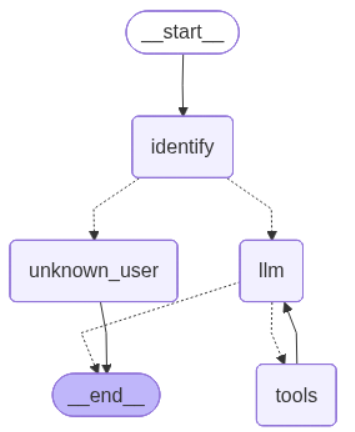
最后,我们构建并编译图。
```python theme={null}
# 构建图
builder = StateGraph(GraphState)
builder.add_node("identify", identify_node)
builder.add_node("unknown_user", unknown_user_node)
builder.add_node("llm", llm_node)
builder.add_node("tools", tool_node)
builder.set_entry_point("identify")
builder.add_conditional_edges("identify", route_from_identify, {"llm": "llm", "unknown_user": "unknown_user"})
builder.add_conditional_edges("llm", route_from_llm, {"tools": "tools", END: END})
builder.add_edge("tools", "llm")
graph = builder.compile()
```
我们可在下方可视化该应用:
```python theme={null}
from IPython.display import Image, display
from langchain_core.runnables.graph import CurveStyle, MermaidDrawMethod, NodeStyles
display(Image(graph.get_graph().draw_mermaid_png()))
```
 现在我们可以像之前一样调用图:
```python theme={null}
question = "显示我最近的 3 张发票。"
for step in graph.stream(
{"messages": [{"role": "user", "content": question}],
"first_name": "Frank",
"last_name": "Harris",
},
stream_mode="values",
):
step["messages"][-1].pretty_print()
```
```
================================ 人类消息 =================================
显示我最近的 3 张发票。
================================ 人类消息 =================================
显示我最近的 3 张发票。
================================== AI 消息 ==================================
工具调用:
execute_sql (call_5wfXt4YKdS2xttnEFc68uG4F)
调用 ID: call_5wfXt4YKdS2xttnEFc68uG4F
参数:
query: SELECT InvoiceId, InvoiceDate, BillingAddress, BillingCity, BillingState, BillingCountry, BillingPostalCode, Total
FROM Invoice
WHERE CustomerId = :customer_id
ORDER BY InvoiceDate DESC, InvoiceId DESC
LIMIT 3;
================================= 工具消息 =================================
名称: execute_sql
[(374, '2013-07-04 00:00:00', '1600 Amphitheatre Parkway', 'Mountain View', 'CA', 'USA', '94043-1351', 5.94), (352, '2013-04-01 00:00:00', '1600 Amphitheatre Parkway', 'Mountain View', 'CA', 'USA', '94043-1351', 3.96), (329, '2012-12-28 00:00:00', '1600 Amphitheatre Parkway', 'Mountain View', 'CA', 'USA', '94043-1351', 1.98)]
================================== AI 消息 ==================================
以下是您最近的 3 张发票:
- 发票编号: 374 | 日期: 2013-07-04 | 总额: 5.94 | 账单地址: 1600 Amphitheatre Parkway, Mountain View, CA, USA 94043-1351
- 发票编号: 352 | 日期: 2013-04-01 | 总额: 3.96 | 账单地址: 1600 Amphitheatre Parkway, Mountain View, CA, USA 94043-1351
- 发票编号: 329 | 日期: 2012-12-28 | 总额: 1.98 | 账单地址: 1600 Amphitheatre Parkway, Mountain View, CA, USA 94043-1351
```
请参阅 [LangSmith 跟踪记录](https://smith.langchain.com/public/05ce5f9b-18d3-47fe-9a14-49e32fcac14e/r) 以查看上述运行详情。
## 后续步骤
请参阅[评估图](/langsmith/evaluate-graph)指南,了解如何使用 LangSmith 评估 LangGraph 应用程序,包括像这样的 SQL 代理。
现在我们可以像之前一样调用图:
```python theme={null}
question = "显示我最近的 3 张发票。"
for step in graph.stream(
{"messages": [{"role": "user", "content": question}],
"first_name": "Frank",
"last_name": "Harris",
},
stream_mode="values",
):
step["messages"][-1].pretty_print()
```
```
================================ 人类消息 =================================
显示我最近的 3 张发票。
================================ 人类消息 =================================
显示我最近的 3 张发票。
================================== AI 消息 ==================================
工具调用:
execute_sql (call_5wfXt4YKdS2xttnEFc68uG4F)
调用 ID: call_5wfXt4YKdS2xttnEFc68uG4F
参数:
query: SELECT InvoiceId, InvoiceDate, BillingAddress, BillingCity, BillingState, BillingCountry, BillingPostalCode, Total
FROM Invoice
WHERE CustomerId = :customer_id
ORDER BY InvoiceDate DESC, InvoiceId DESC
LIMIT 3;
================================= 工具消息 =================================
名称: execute_sql
[(374, '2013-07-04 00:00:00', '1600 Amphitheatre Parkway', 'Mountain View', 'CA', 'USA', '94043-1351', 5.94), (352, '2013-04-01 00:00:00', '1600 Amphitheatre Parkway', 'Mountain View', 'CA', 'USA', '94043-1351', 3.96), (329, '2012-12-28 00:00:00', '1600 Amphitheatre Parkway', 'Mountain View', 'CA', 'USA', '94043-1351', 1.98)]
================================== AI 消息 ==================================
以下是您最近的 3 张发票:
- 发票编号: 374 | 日期: 2013-07-04 | 总额: 5.94 | 账单地址: 1600 Amphitheatre Parkway, Mountain View, CA, USA 94043-1351
- 发票编号: 352 | 日期: 2013-04-01 | 总额: 3.96 | 账单地址: 1600 Amphitheatre Parkway, Mountain View, CA, USA 94043-1351
- 发票编号: 329 | 日期: 2012-12-28 | 总额: 1.98 | 账单地址: 1600 Amphitheatre Parkway, Mountain View, CA, USA 94043-1351
```
请参阅 [LangSmith 跟踪记录](https://smith.langchain.com/public/05ce5f9b-18d3-47fe-9a14-49e32fcac14e/r) 以查看上述运行详情。
## 后续步骤
请参阅[评估图](/langsmith/evaluate-graph)指南,了解如何使用 LangSmith 评估 LangGraph 应用程序,包括像这样的 SQL 代理。